
Phase Motion 2
Advanced Stereo Phaser
Stereo Phaser
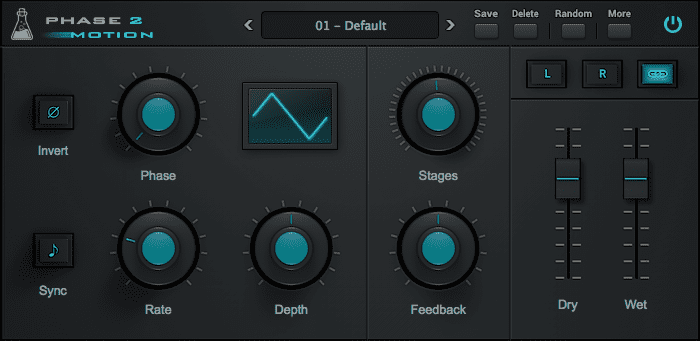
Phase Motion 2 is a stereo phaser plugin featuring up to 32 phasing stages.
The Rate can be adjusted in Hertz or it can be synced to the host/DAW tempo. You can choose 6 waveforms (sine, triangle, ramp up, ramp down, square, random) to modulate the phase, and you can tweak Depth and Feedback to get a classic vintage phaser sound or extreme digital modulations.
Phase Motion 2 is available for macOS, Windows, and Linux (VST2, VST3, AU, AAX, CLAP).
Listen to audio demos
Stereo Phaser
Phase Motion 2 is a stereo phaser, meaning you can have different settings on each channel. Essentially it is like having two phasers, one for the Left and one for the Right channel.
By clicking on the L or R button, the parameters will only control the selected channel. Instead, when the Link icon is selected, both L and R parameters will be affected.
Tips to make a thicker stereo phaser sound:
- Have the same settings on both L and R channel, but slightly change one or two parameters on one channel only.
- Have a positive amount of Feedback on one channel, and a negative amount on the other channel.
- Use the Invert button only on one channel.
Phase Motion 2 Demo
Try Phase Motion 2 for free with some limitations: silence for 3 seconds every 45 seconds, saving disabled.
If you like it, you can purchase a license and then authorize the demo version.
Requires macOS 10.9 or higher
AU, VST2, VST3, AAX (64bit only)
Requires Windows 7 or higher
VST2, VST3, AAX (64bit only)
Requires Ubuntu 20.04 or newer
VST2, VST3, CLAP (64bit only)
macOS
Requires macOS 10.9 or higher
AU, VST2, VST3, AAX (64bit only)
Download demoWindows
Requires Windows 7 or higher
VST2, VST3, AAX (64bit only)
Download demoLinux
Requires Ubuntu 20.04 or newer
VST2, VST3, CLAP (64bit only)
Download demoSpecifications
- 32 Phasing Stages
- 6 LFO Waveforms
- Rate can be synced to the host tempo
- Lightweight on CPU
- Preset system with randomizer
System Requirements
Windows
Windows 7 – 11
2GHz CPU, 4 GB RAM
VST2, VST3, AAX, CLAP (64-bit)
macOS
OS X 10.9 – macOS 14
2GHz CPU, 4 GB RAM
VST2, VST3, AU, AAX, CLAP (64-bit)
Universal 2 Binary
Linux
Ubuntu 20.04 LTS
2GHz CPU, 4 GB RAM
VST2, VST3, CLAP (64-bit)
Changelog
v2.1 2023/10/28
- Added: VST3 and CLAP plugin format
- Added: Linux VST2, VST3, CLAP plugin formats
- Added: macOS 14 Sonoma support (Universal 2 Binary)
- Added: Windows 11 support
- Improved: CPU and memory usage
v2.0.0 2017/07/10
- Improved: DSP redesigned from scratch
- Improved: Stability and CPU usage
- Added: Bipolar Feedback control
- Added: Left and Right parameters (+ stereo link)
- Added: Waveform Phase control
- Added: Up to 32 stages (from 16)
v1.5.0 2015/12/17
- Values can now be input with text
- Better parameter smoothing
- Improved CPU performance
- Improved Top Bar
v1.2.5 2015/04/25
- Added up to 4 Bars sync values
- Added Randomizer Lock system
- Fixed Latch/Automation issue
- Fixed Sync issues with long sessions
v1.2.0 2015/01/14
- Added 2 new waveforms (smooth square and smooth saw)
- New improved Preset System
- VST sync and preset bug fixed
- General CPU optimization
Copy Protection
To activate your plugin you can choose between Online and Offline authorization.
Create an account, log in through the plugin to activate, or download your license file for offline activation.
Activation
1 license up to 3 computers
No iLok
We don’t like dongles
No Internet
No connection required to activate