
Space Strip
Modular Channel Strip
Modular Effects
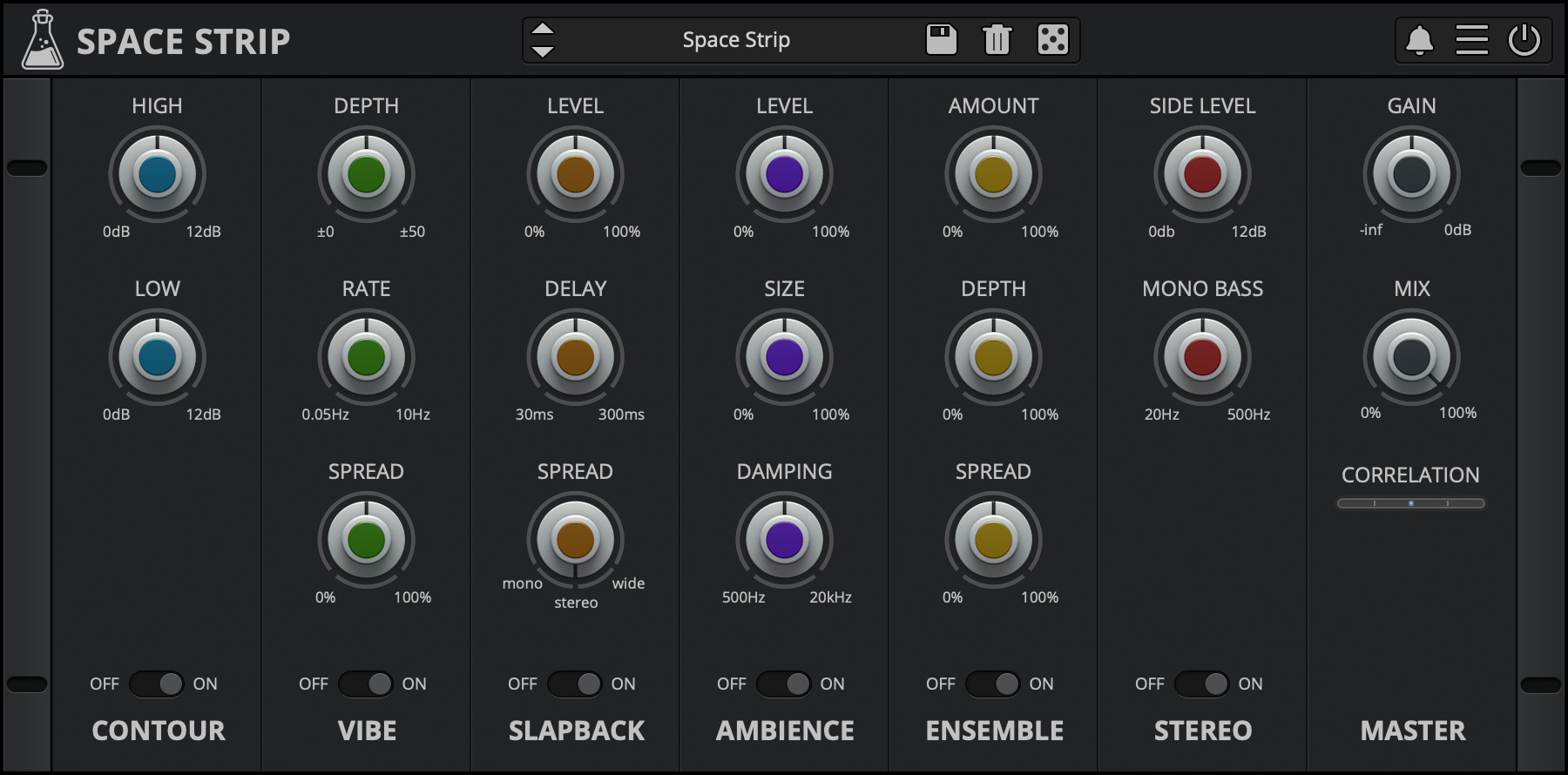
Space Stripis a six-module multi-effect plugin built around simple, flexible routing. The included modules Contour, Vibe, Slapback, Ambience, Ensemble, and Stereo, can be arranged in any order using drag and drop. Space Strip focuses on shaping depth, movement, and spatial balance rather than heavy effects. It works particularly well on synthesizers and keyboards, but can also be used on other sound sources where subtle space and character are needed. The plugin is designed to be lightweight and suitable for use across multiple tracks without significant CPU load.
Space Strip is available for macOS, Windows, and Linux (VST, VST3, AU, AAX, CLAP).
It’s also available on the App Store for iOS and iPadOS (AUv3 and Standalone).
Listen to audio demos
6 Modules
Space Strip combines 6 modules to add depth and space to your sounds.
- Contour, 2-band EQ
- Vibe, stereo vibrato
- Slapback, short echo module
- Ambience, short reverb module
- Ensemble, multi-voices chorus
- Stereo, stereo manipulation
Drag and Drop
You can customize your channel strip with a simple drag-and-drop.
By default, all modules (except the Master module) can be moved and re-arranged to create different signal flows.
For example, you can decide to add the ensemble module after the slapback, or vice versa.

Reviews

“A great multi-effect (channel strip) for musicians looking to enhance their tracks without breaking their budget. A highly desirable plugin to have in the toolkit in the event a smaller CPU footprint is required when mixing – 4.75/5”
Also available on iOS
Space Strip is available for iPhone and iPad on the App Store, as a AUv3 plugin and Standalone (IAA).
Download on theApp Store
Space Strip Demo
Try Space Strip for free with some limitations: silence for 3 seconds every 45 seconds, saving disabled.
If you like it, you can purchase a license and then authorize the demo version.
macOS
Requires macOS 10.13 or higher
AU, VST2, VST3, AAX, CLAP (64bit only)
Download DemoWindows
Requires Windows 7 or higher
VST2, VST3, AAX, CLAP (64bit only)
Download DemoLinux
Requires Ubuntu 20.04 or newer
VST2, VST3, CLAP (64bit only)
Download DemoSpecifications
- 6 modules: Contour, Vibe, Slapback, Ambience, Ensemble, Stereo
- All modules can be arranged by drag-n-drop
- Lightweight on CPU
- Resizable Window
- Brightness and Contrast Controls
- Preset system with randomizer
System Requirements
Windows
Windows 7 – 11
2GHz CPU, 4 GB RAM
VST2, VST3, AAX, CLAP (64-bit)
macOS
macOS 10.13 – macOS 26
2GHz CPU, 4 GB RAM
VST2, VST3, AU, AAX, CLAP (64-bit)
Universal 2 Binary
Linux
Ubuntu 20.04 LTS
2GHz CPU, 4 GB RAM
VST2, VST3, CLAP (64-bit)
Changelog
v1.3 2026/01/14
- Added: Stereo Correlation Meter
- Added: Graphics Controls (Brightness and Contrast)
- Added: macOS 26 Tahoe support
- Improved: New GUI with support for Retina/HiDPI displays
- Improved: CPU and Memory Usage
v1.2 2023/04/24
- Added: macOS 12 Monterey support (Universal 2 Binary)
- Added: CLAP plugin format
- Added: AAX Silicon Support
- Improved: CPU and memory usage
- Fixed: Potential AU validation crash
v1.1.2 2020/04/30
- Fixed: Mono and Mono to Stereo modes causing noises in some hosts
v1.1 2020/02/19
- Added: macOS 10.15 Catalina support
- Added: VST3 plugin format
- Added: Parameter Lock
- Added: Edit Value option for Knobs
- Added: Notification System
- Added: Online Authorization Form
- Added: Global option – Resizable Window
- Added: 10 New Presets
- Improved: Modules bypass
v1.0.1 2017/07/04
- Fixed bug causing noise burst on some hosts (FL Studio 32bit, Maschine)
Copy Protection
To activate your plugin you can choose between Online and Offline authorization.
Create an account, log in through the plugin to activate, or download your license file for offline activation.
Activation
1 license up to 3 computers
No iLok
We don’t like dongles
No Internet
No connection required to activate