
Seconds
Spectral Sound Design Effect

A spectrum of possibilities
Seconds is a spectral sound design effect that uses bandpass filters, ring modulation, saturation, panning, and sample rate reduction to creatively shape any signal.
At its heart is a bank of 48 bandpass filters tuned in “seconds”, or whole-tone steps. Cut up sounds, sequence their spectrum via MIDI, or freeze the spectrum of one sound and apply it to another.
From lush modulation and rotary effects to harsh metallic tones, booming bass drums, and glassy pings, Seconds is a rich toolbox for experimental sound design.
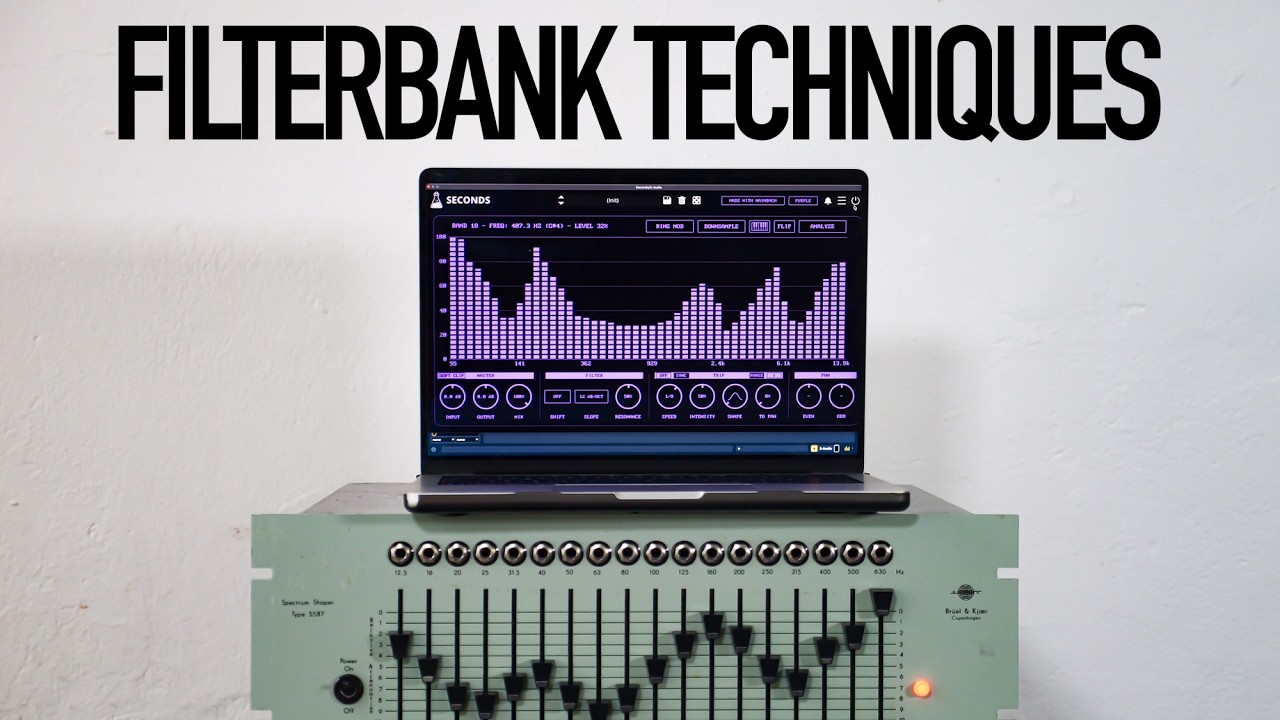

48 bands of spectral shaping
A bank of 48 analog modelled bandpass filters gives you finely tuned control over the spectrum. Each band is spaced a whole tone apart, with resonance control and a choice of 12 or 24 dB slopes.
The filter topology comes from Dials and Octaves, modelled on passive inductive coils. Shape a sound gently, or push the filters into much more intense territory.

Play and transfer the spectrum
Use MIDI to play the filter bank and sequence the spectrum of a sound. Turn filtering into a part of your composition, from changing patterns to glassy pings and booming percussion.
Analyse and freeze the spectrum of one sound, then apply it to another. Spectral transfer gives a different sound the shape of the captured spectrum.

From lush to destructive
Add ring modulation per band for metallic tones and complex textures. Pan odd and even bands separately, then add volume and panning modulation for lush movement and rotary effects.
A high-gain input stage with saturation and a brutal sample rate reduction option lets you boost and cut a signal into much rougher territory.

The origins of Seconds
Seconds began during one of our regular meetings with Hainbach in Berlin. He pulled two books from his library: a history of the SWR Experimentalstudio in Freiburg and the massive Brüel & Kjær 1983 master catalogue.
At SWR, filter processes were central to the compositional practice. Analog filter banks came first, followed by digital filters. In the studio’s history, Hans Peter Haller describes a special “Sekundenfilterbank” developed together with Sennheiser in the late 1980s and early 1990s: a digital 48-band filter bank that could sequence filters with MIDI and freeze a spectrum to transfer it to another sound.
In the second book, Hainbach pointed to the Digital Frequency Analyzer 2131. Its frequency display looked beautiful even in print, and we could immediately imagine how it might translate to a modern touch interface.
Out of that conversation, Seconds was born: a filter bank inspired by a rare instrument, the clean Danish design of a vintage analyser, and our own ideas about how a filter bank should sound and play today.

Hainbach
Berlin-based electro-acoustic composer Hainbach explores esoteric synthesizers, test equipment, and magnetic tape. Seconds brings that spirit of experimentation to a playable spectral effect.
His insistence on ring modulation helped take the filter bank beyond gentle shaping into a much wider sonic palette.
Seconds Demo
Try Seconds for free before you buy.
macOS
Requires macOS 10.13 or higher
AU, VST2, VST3, AAX, CLAP (64bit only)
Download DemoWindows
Requires Windows 7 or higher
VST2, VST3, AAX, CLAP (64bit only)
Download DemoLinux
Requires Ubuntu 20.04 or newer
VST2, VST3, CLAP (64bit only)
Download DemoSpecifications
- 48 analog modelled bandpass filters
- 12 / 24 dB slopes with resonance control
- Playable via MIDI
- Spectral analysis, freeze, and transfer
- Ring modulation per band
- Odd / even panning control
- Volume and panning modulation
- Input saturation and sample rate reduction
System Requirements
Windows
Windows 7 – 11
2GHz CPU, 4 GB RAM
VST2, VST3, AAX, CLAP (64-bit)
macOS
macOS 10.13 – macOS 26
2GHz CPU, 4 GB RAM
VST2, VST3, AU, AAX, CLAP (64-bit)
Universal 2 Binary
Linux
Ubuntu 20.04 LTS
2GHz CPU, 4 GB RAM
VST2, VST3, CLAP (64-bit)
Changelog
v1.0 12 November 2026
- Initial release.
Copy Protection
To activate your plugin you can choose between Online and Offline authorization.
Create an account, log in through the plugin to activate, or download your license file for offline activation.
Activation
1 license up to 3 computers
No iLok
We don’t like dongles
No Internet
No connection required to activate